On this page
How to Redesign a Website With AI: My 30-Minute Workflow
25 September 2026
6 min read
I used a Refero design guide, almost 100 planning questions, recent photos, and an overnight coding-agent run to redesign my wife's dance studio website.
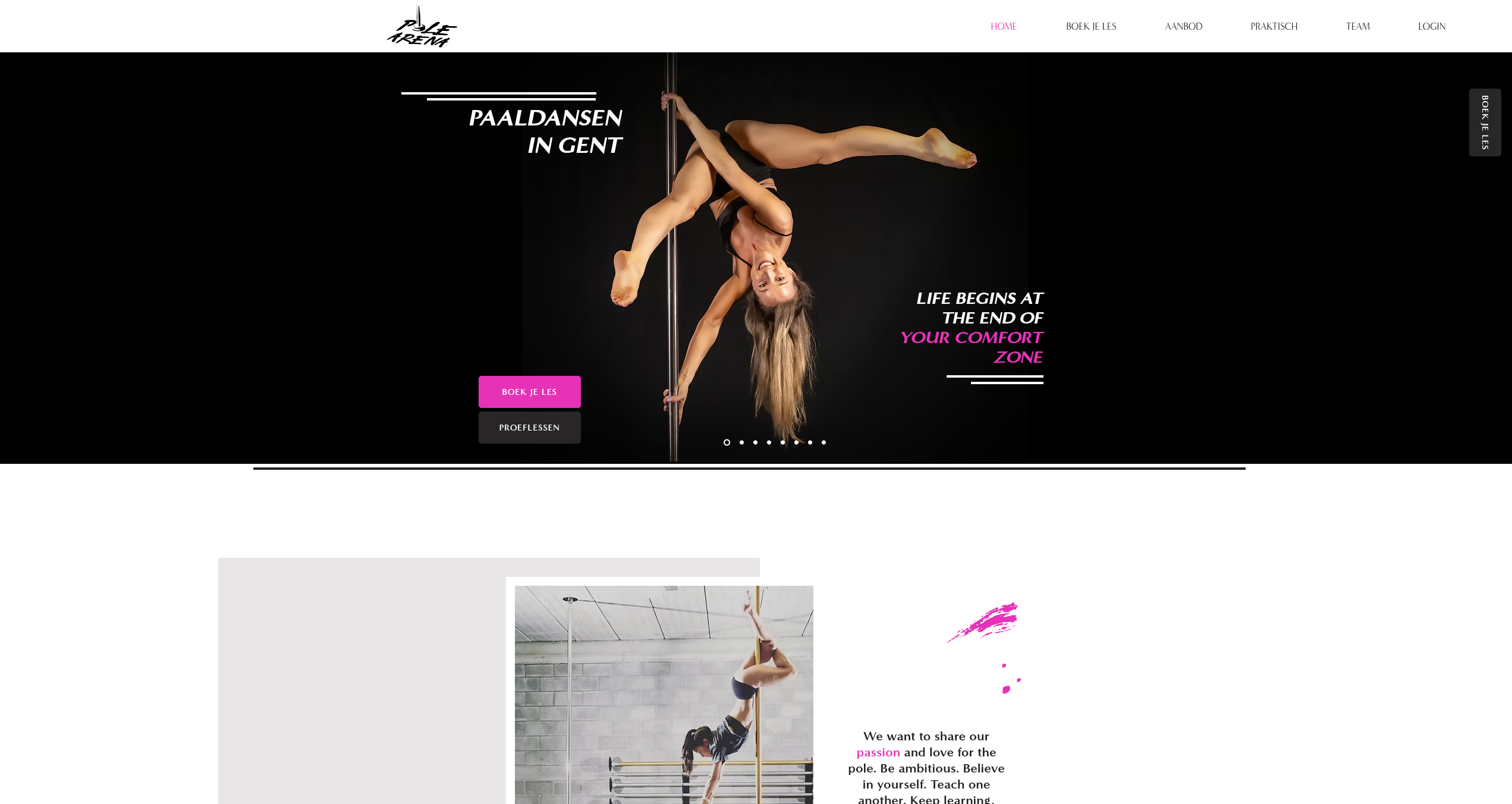 Before
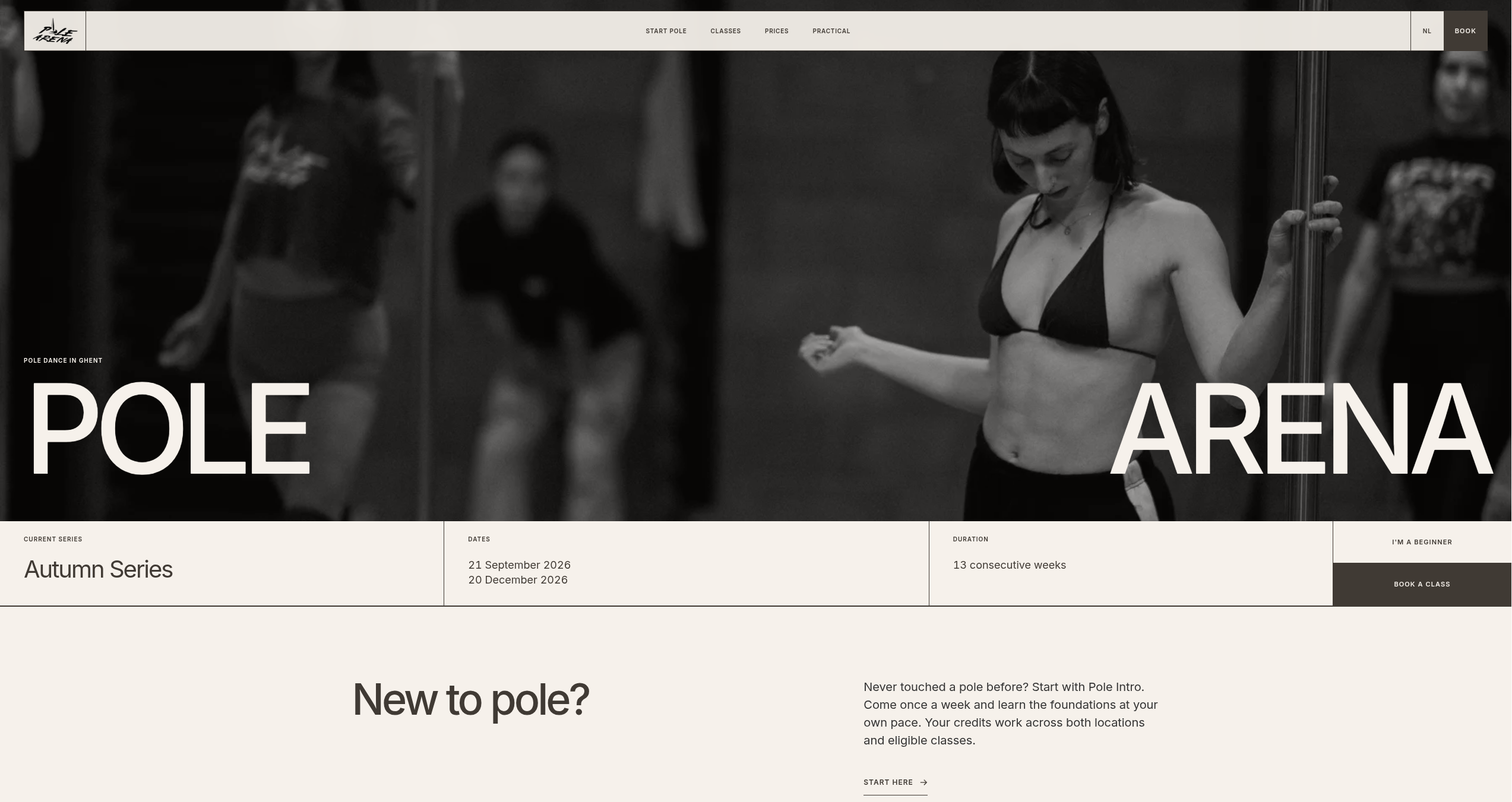 After
AfterTL;DR
- The redesign took about 30 minutes of my hands-on time, followed by an unattended overnight run, and cost around $15 in tokens.
- I started with a full markdown design guide from Refero instead of asking the agent to invent a visual direction.
- Matt Pocock's grill-me skill prompted almost 100 questions and turned a short brief into a detailed specification.
- Recent photography gave the agent strong, brand-specific source material to work with.
- I used GPT-6-Sol with high reasoning for the specification and GPT-5.6-Luna with medium reasoning for token-efficient execution.
Give a coding agent a one-line prompt to make a website and you will often get the same result: generic gradients, vague copy, and sections that could belong to any company.
People call this AI slop. It happens because the agent has to fill in every blank itself. With no clear direction, it falls back on common patterns.
Hi, I am Maarten, co-founder of Alayans. We build an AI assistant that helps project managers turn meetings and project email into prepared follow-ups, calendar changes, and task updates. I use coding agents often, and I want to share the process I follow to get good work from them.
Pole Arena is my wife's pole dance studio in Ghent. The studio had grown and the website had not kept up. The old site was honestly becoming embarrassing, so I had to do something about it.
I spent about 30 minutes giving the agent direction and answering questions. Then I started the build and let it work overnight. The token cost was around $15.
The agent could move quickly because we had already made the important decisions before it started coding.
The process in one minute
- Pick a visual direction from Refero's design style library.
- Copy the full markdown design guide for that style.
- Give the agent the current website, the design guide, and a short brief.
- Use Matt Pocock's `grill-me` skill to turn the brief into a detailed specification.
- Add recent photos to the project folder.
- Use a strong model for planning and a cheaper model for the build.
- Let the coding agent run unattended with
/goal. - Review the result, refine the details, and publish.
Step 1: choose a design direction
I opened styles.refero.design and picked a style that felt right for Pole Arena. Each style comes with a markdown guide. The guide describes the typography, colors, spacing, layout, images, and components.
I pasted the full guide into my prompt and asked the agent to save it in design.md. This made the visual direction clear from the start.
I used the reference only for its design rules. The page structure and content still came from Pole Arena.
Step 2: give the agent the website and the prompt
This is the prompt I used:
I want to make a redesign of the polearena.be website.
$grill-me

I want to base the new design on the following design guides (save this in a design.md file maybe also)
[the full .md content of the design style I picked on https://styles.refero.design/]

When writting any content, avoid em dashes and typical AI writting styles such as "it is not this, it is that", etc.
Keep the design clean, avoiding redundant text and bloat.
That was my full starting prompt. The agent could inspect the existing website for context and use the pasted guide for the new visual direction.
Step 3: let the agent ask the questions
The longest part of my input was answering questions. I used the grill-me skill, which made the agent interview me before it wrote any code. It asked almost 100 questions.
The questions covered the content, navigation, calls to action, target audience, classes, languages, mobile layout, and photography. It also asked about many small details I had not included in my first prompt.
My answers became the specification for the build. This removed most of the guessing later on.
Almost 100 questions sounds like a lot, but answering them was quick. Fixing the wrong website afterwards would have taken much longer.
Step 4: add real photos
I added photos from Pole Arena's latest photoshoot to the project root. I let the agent inspect them and decide which photos to use in each section.
These photos made the site feel like Pole Arena. The agent had no reason to reach for stock images or decorative filler.
Step 5: split planning from execution
I used one model for planning and another for the build:
| Job | Model | Why |
|---|---|---|
| Specification | GPT-6-Sol, high reasoning | I wanted the strongest model for the questions and the specification. |
| Build | GPT-5.6-Luna, medium reasoning | The clear specification made a cheaper model sufficient for the build. |
I spent the more expensive tokens on the decisions. Once the specification was ready, Luna had a clear job to execute.
Step 6: let it run overnight
Once the specification was ready, I started /goal and left it running overnight. The agent could inspect the project, build the site, test its work, and continue without waiting for me after each step.
I also let the agent choose the technical stack. My requirement was simple: pick an SEO-friendly approach. It chose Astro with TypeScript.
My own time on the project was about 30 minutes. The build ran unattended. The final token cost was around $15.
What came out
The screenshots at the top show the result. The photos now lead the design, the navigation is simpler, and the important information is easier to find.
I still need to refine a few details, check the text and booking links, test the mobile layouts, and put it online. The main redesign is done.
Why this worked
The agent had three useful inputs before it started coding: a design guide, a detailed specification, and recent photos from the studio. That gave it enough direction to build something specific to Pole Arena.
Splitting the work between two models also kept the cost low. I used the stronger model where decisions were still open and the cheaper model once the job was clear.
Use this process for your own website
You can use the same process for a new site or a redesign:
- Pick a design style you like and copy its markdown guide.
- Give the agent your current website and your short brief.
- Let the agent interview you until the specification is complete.
- Add your best recent photos and other real assets.
- Check the specification before the agent starts coding.
- Let the agent build and test the site.
- Review the result yourself and fix the final details.
That is the full process. It took about 30 minutes of my time, around $15 in tokens, and one unattended overnight run.