
Why We Moved From Resend to Amazon SES
16 May 2026
7 min read
We started with Resend because it was quick and pleasant to use. We moved to Amazon SES once email volume, cost, and deliverability monitoring started to matter.
TL;DR
- We started with Resend because it was quick to integrate, pleasant to use, and enough for our early volume.
- As sending volume grew, Amazon SES became much cheaper for the same amount of email.
- SES gives you infrastructure, not a full product, so we built a small Go and Postgres backend around sending, events, suppression, scheduling, and replies.
- Each sender inbox is capped at 50 emails per day, and sending is randomized across inboxes and domains.
- Deliverability needs active monitoring through tools like Google Postmaster Tools and Amazon SES Virtual Deliverability Manager, because a burned domain should be paused or retired.
A few years ago, choosing AWS for anything felt like signing up for a part-time cloud engineering job. The console was intimidating, the services all seemed to depend on each other, and there was always that slight fear that you had left something running somewhere and would find out at the end of the month.
That reputation stuck with us. So when we needed a reliable way to send emails at Alayans, we did what many teams do: we picked Resend. It was easy to integrate, the API was clean, and the free tier of 3,000 emails per month was enough at the time.
The Free Tier Eventually Stops Being the Point
Resend is a good product. This is not a "we hated it and had to escape" story. The issue was simply that our usage changed.
After the free tier, Resend is around $20 per month for 50,000 emails. With Amazon SES, that same $20 gets you closer to 200,000 emails.
If you send a few product emails or the occasional newsletter, this probably does not matter. For us, running outreach across multiple domains, it started to matter pretty quickly. SES also does not charge extra per domain or push you into a different plan just because volume increases.
We looked at a few newer options too, including Cloudflare Email Sending, but SES was still the cheapest and most mature option for what we needed.
SES Setup Was Less Painful Than Expected
The biggest surprise was the setup. I expected the usual AWS scavenger hunt. Instead, SES was fairly straightforward: verify the domain, add the DNS records, request production access, and start sending.
It still has the classic AWS shape though. SES gives you the sending infrastructure, not the full product around it. You still need to decide how to handle bounces, complaints, unsubscribes, scheduling, retries, and reporting.
What We Built Around It
Instead of paying for those pieces as part of a managed email platform, we built a small backend around SES.
We use Amazon SNS for delivery events: bounces, complaints, and successful sends. SES publishes those events to SNS, and our backend consumes them and updates our own records.
The core is a small Go service backed by Postgres. Postgres stores lead lists, campaign history, and suppression data: unsubscribes, bounces, and complaints. A lightweight scheduler queues emails in small batches during our sending window, and the service sends the messages through SES over SMTP.
We also cap volume at the inbox level. Each sender inbox sends at most 50 emails per day, and the scheduler randomizes sending across domains and inboxes instead of pushing one domain hard. That gives us better control over pacing, keeps the traffic pattern more natural, and makes it easier to stop a single inbox without stopping the whole system.
For inbound replies, we use Cloudflare Email Routing. It forwards replies to our backend, where we parse the message, attach it to the right conversation, and decide whether it should be forwarded to the team. This also means we do not need to buy a real inbox for every sender on every domain we own. No Google Workspace, Zoho, or similar subscription just to receive replies.
The nice part is that all the important state is ours. If a lead hard-bounces or complains, we suppress them. If someone unsubscribes, we update the record immediately. There is no separate dashboard or hidden system that we need to reconcile later.
The Full Setup
At a high level, the system looks like this:
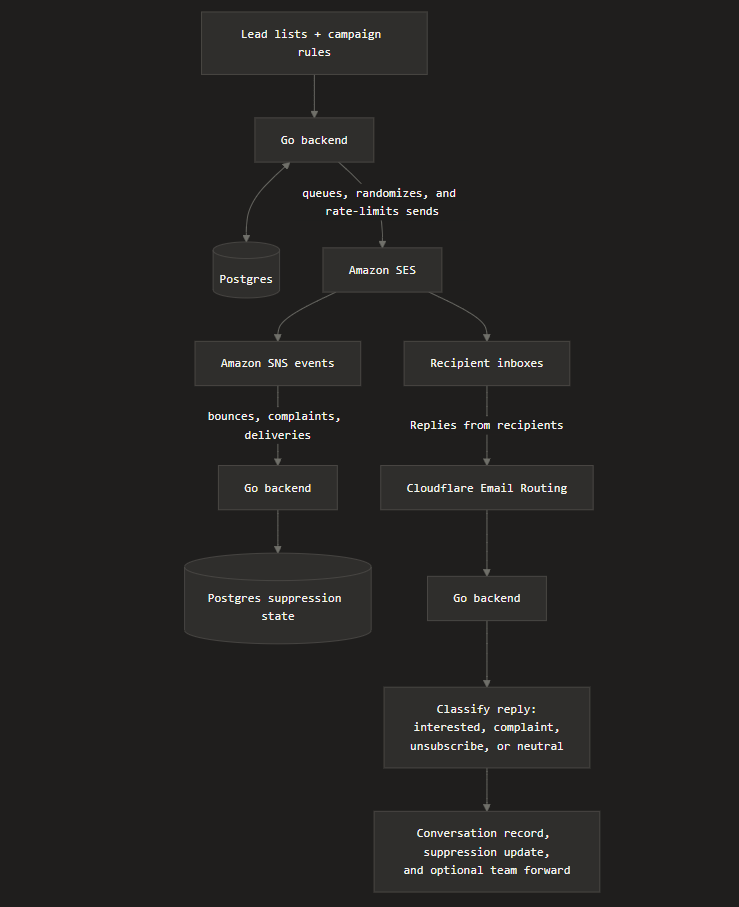
SES handles outbound delivery. SNS reports what happened after sending. Cloudflare Email Routing handles inbound replies. The Go backend sits in the middle and owns the business logic: who can be contacted, which inbox should send, when the email should go out, whether the contact should be suppressed, how a reply should be classified, and where replies should be attached.
That reply classification is important. Each inbound reply is classified as interested, complaint, unsubscribe, or neutral. Interested replies can be surfaced to the team. Complaints and unsubscribes update suppression state so we do not contact that person again. Neutral replies stay attached to the conversation without creating unnecessary action.
Monitoring Inbox and Domain Health
The backend is only half of the story. If a domain is burned, sending more email from it does not help. It usually makes the problem worse. You need a way to see when an inbox or domain is starting to lose trust, and you need to be willing to stop sending from it.
For Gmail visibility, we use Google Postmaster Tools. It gives domain owners a view into Gmail-specific deliverability signals, including spam rate, domain and IP reputation, authentication, encryption, feedback loop data, and delivery errors. That does not tell you exactly where every email landed, but it does give you a useful health signal for Gmail recipients.
The main things to watch are:
- spam rate: if this starts climbing, people are actively telling Gmail they do not want your mail
- domain reputation: if it drops from high or medium into low or bad territory, the domain is losing trust
- IP reputation: useful when traffic comes through a shared or dedicated sending IP that starts causing issues
- authentication: SPF, DKIM, and DMARC failures are basic deliverability problems that should be fixed immediately
- delivery errors: spikes here can indicate throttling, blocking, or policy problems at Gmail
On the SES side, Virtual Deliverability Manager gives you Amazon's view of your sending and delivery data. The dashboard shows delivery and reputation trends, including bounce and complaint statistics, and the advisor gives recommendations when configuration or reputation issues are likely hurting deliverability.
The signals we care about most are bounce rate, complaint rate, delivery rate, open and click trends, and VDM advisor recommendations. A burned domain usually does not show up as one perfect metric. It shows up as a pattern: complaints rise, opens fall, delivery errors increase, Gmail reputation drops, and the same copy performs normally on healthier domains.
When that happens, the right move is not to keep forcing volume through the domain. We pause it, inspect the campaign and list quality, check authentication, review bounce and complaint sources, and only resume if the health signals recover. Sometimes the pragmatic answer is to retire the domain from outbound sending entirely.
Was It Worth It?
For us, yes.
We kept the architecture boring on purpose: Postgres for state, SES for delivery, SNS for feedback, and a small Go service to tie it together. It is not glamorous, but it is cheap, predictable, and easy to debug.
Resend is still a great choice if you want to send emails with almost no setup and no backend work. We may still recommend it for that use case. But if you are comfortable owning a small amount of infrastructure, SES is much more approachable than it used to be.
Bottom line: AWS still has rough edges, but SES is no longer the painful option I remembered. For higher-volume sending, the savings easily justify the small amount of backend work around it.